

Graphics Driver Preferences APK 1.1.4

Advertisement
Graphics Driver Preferences APK is an official Android system feature that allows per-app GPU driver selection to improve performance stability. By choosing the right graphics driver for each game or app, users can achieve smoother gameplay, reduced stutter, and better frame consistency without risky system modifications.
Information of Graphics Driver Preferences
About Graphics Driver Preferences
Graphics Driver Preferences APK – Per-App GPU Performance Boost
Modern Android gaming and graphics-intensive applications demand more than raw hardware power. Today, performance is defined by stability, consistency, and how efficiently the system communicates with the GPU. Graphics Driver Preferences APK plays a key role in this process by allowing Android to control how individual apps interact with different graphics drivers.
Instead of forcing a single graphics configuration across the entire device, this system feature enables per-app GPU optimization. Each game or application can run with the driver that best suits its workload. The result is smoother gameplay, fewer graphical issues, and better long-term stability without aggressive system modifications.
Unlike third-party boosters or heavy system tweaks, Graphics Driver Preferences works entirely within Android’s official graphics framework. It focuses on practical improvements such as frame consistency, rendering reliability, and predictable performance. For users who care about control rather than shortcuts, this feature has become an important part of advanced Android performance tuning.
What Is Graphics Driver Preferences APK on Android
Graphics Driver Preferences is not a typical app that you install and open like a game or utility tool. It is a system-level feature built into Android, available on devices running Android 10 and newer. Its purpose is to let users and developers choose which graphics driver a specific application should use.
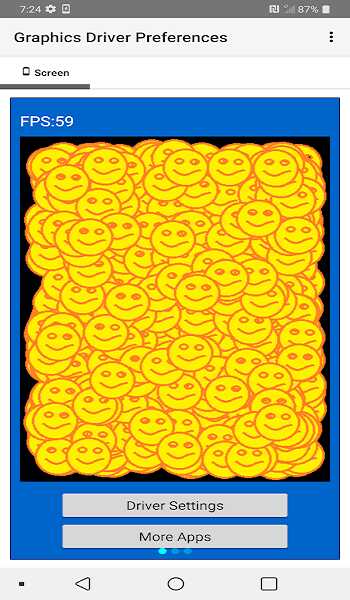
Many users search for it using the term “APK” because game driver components are delivered as modular system packages and updated through official channels. While the settings interface is accessed via Developer Options, the drivers themselves can be updated independently, without requiring a full system update. This design gives Android more flexibility to improve graphics performance over time.
At its core, Graphics Driver Preferences exists because not all apps benefit from the same graphics driver. Some applications prioritize stability and compatibility, while others rely on newer driver features to handle modern graphics workloads. By adjusting GPU behavior on a per-app basis, Android avoids the limitations of a one-size-fits-all approach.
How Per-App GPU Driver Selection Works
Every Android device relies on graphics drivers to translate an app’s rendering instructions into commands the GPU can process. These drivers influence how frames are rendered, how shaders are handled, and how efficiently the GPU manages complex scenes.
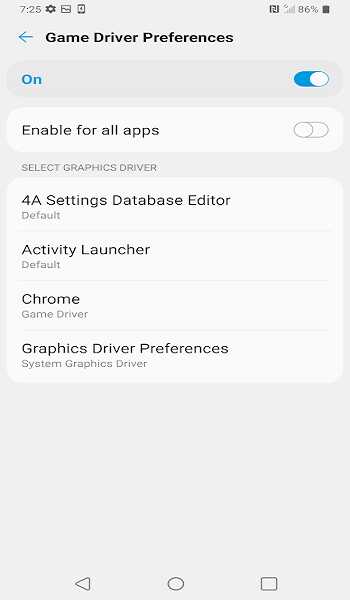
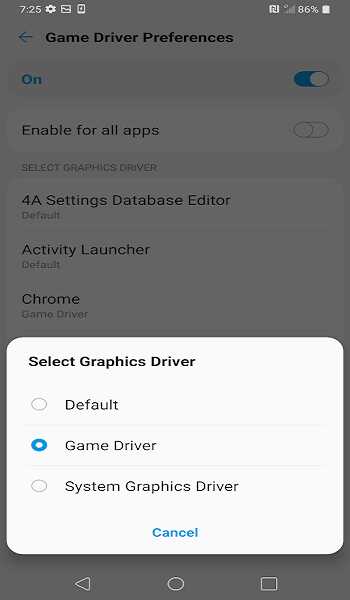
With Graphics Driver Preferences, Android introduces a per-application decision layer. Instead of applying one graphics driver globally, users can assign different drivers to individual apps. In practice, this usually means choosing between:
-
The default driver selected by the device manufacturer
-
The system graphics driver included with the current Android version
-
A game-optimized driver updated through official system components
This approach matters because different apps stress the GPU in different ways. A fast-paced shooter benefits from stable frame delivery, while a visually rich open-world game may perform better with newer driver optimizations. By isolating driver behavior per app, Android reduces compatibility risks and allows performance improvements exactly where they are needed.
System Graphics Driver vs Game Driver: Key Differences
This comparison is the foundation of Graphics Driver Preferences. Understanding how these two driver types behave helps you make better decisions instead of relying on trial and error.
System Graphics Driver: Stability Comes First
The System Graphics Driver is the most conservative option available. It is tightly integrated with the Android version running on your device and thoroughly tested for compatibility across hardware and software components.
Key characteristics of the system graphics driver include:
-
High overall stability
-
Strong compatibility with a wide range of apps
-
Predictable battery usage and thermal behavior
For older games, non-demanding applications, or devices with limited thermal capacity, the system driver often provides the most reliable experience. It minimizes crashes and visual issues, making it a safe choice for daily use.
Game Driver: Performance-Oriented GPU Optimization
The Game Driver is designed for applications that demand more from the GPU. It is updated independently through official system components and may include optimizations for newer games, rendering techniques, and graphics APIs.
Advertisement
Advertisement
Common benefits of the game driver include:
-
Improved support for modern rendering workloads
-
Optimizations for Vulkan and advanced OpenGL features
-
Fixes for known graphical issues in specific titles
However, newer drivers are not automatically better in every situation. Because game drivers focus on performance improvements, they can sometimes introduce edge-case issues on certain devices or games that are not fully optimized for them.
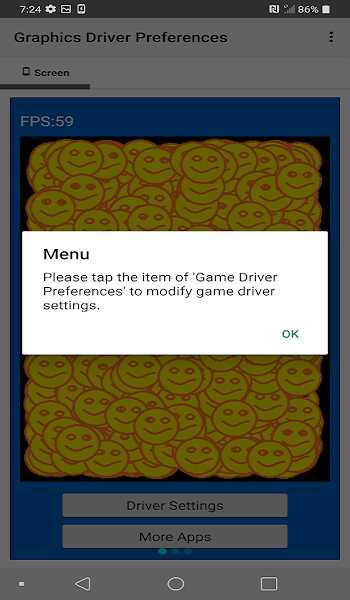
Performance vs Stability: What You Actually Gain
A common misunderstanding is that switching to a game driver will dramatically increase average frame rates. In reality, the most noticeable improvement usually comes from better frame consistency, not higher FPS numbers.
Stable frame timing results in smoother motion and more responsive controls. Even if the average frame rate increases only slightly, reducing micro-stutter and sudden frame drops can make gameplay feel significantly smoother.
Per-App Driver Selection: Why It Matters
Not all applications are built on the same technology. Different game engines manage shaders, textures, and rendering pipelines in unique ways. Applying a single driver to every app forces compromises.
Per-app driver selection allows:
-
Demanding games to benefit from targeted GPU optimizations
-
Stable applications to remain on proven system drivers
-
Reduced risk of system-wide instability
This selective approach is what makes Graphics Driver Preferences effective without being disruptive.
When Game Driver Works Better Than System Driver
Game drivers often provide better results when:
-
A game has recently received a major update
-
The title relies heavily on Vulkan rendering
-
Visual issues such as flickering or texture glitches appear
-
Frame pacing feels inconsistent despite capable hardware
In these situations, switching to the game driver can improve the experience without additional system changes.
When System Driver Is the Safer Choice
The system driver remains the better option when:
-
A game already runs smoothly and consistently
-
The device shows signs of overheating under load
-
The title is older or no longer actively updated
-
The application is not graphics-intensive
In most cases, stability should take priority over small performance gains.
Common Mistakes When Switching Graphics Drivers
Many users make avoidable mistakes, including:
-
Applying the game driver to every app without testing
-
Expecting large FPS increases
-
Ignoring temperature and battery behavior
-
Changing multiple settings at once
Graphics Driver Preferences works best when used carefully and incrementally.
Real Performance Impact: FPS Stability Over Raw FPS
In real-world gaming, performance is not defined by the highest frame rate a device can reach for a few seconds. What truly matters is how stable those frames remain during continuous play. A game that fluctuates between high and low frame rates often feels less smooth than one running at a consistent level.
Graphics Driver Preferences improves performance primarily by enhancing frame stability. By choosing the most suitable driver for a specific game, the system can reduce sudden frame drops, minimize stutter during complex scenes, and maintain smoother motion overall. This is especially noticeable during fast camera movements, intense combat, or crowded environments where rendering demand spikes.
For competitive players, stable frame delivery translates directly into better control. Inputs feel more responsive, aiming becomes more predictable, and visual clarity improves. Even when the average FPS changes only slightly, the overall experience feels more polished and reliable.
Advertisement
How to Enable Graphics Driver Preferences Safely
Graphics Driver Preferences is accessed through Android’s Developer Options. Once enabled, it provides a list of installed applications, allowing you to assign a preferred graphics driver to each one individually.
To use this feature safely, it is important to follow a controlled approach:
-
Apply driver changes only to graphics-intensive games
-
Test performance with one app at a time
-
Observe temperature and battery behavior after changes
Avoid making multiple adjustments simultaneously. This makes it easier to identify whether a specific driver choice improves or worsens performance. Because all changes are applied at the app level, you can always revert to the default driver if needed.
Best Use Cases for Per-App GPU Performance Boost
Graphics Driver Preferences delivers the most value in situations where GPU workload is high or inconsistent. It is particularly useful for:
-
Competitive shooters that require stable frame pacing
-
Open-world games with complex lighting and textures
-
Games that receive frequent graphical updates
-
Users comparing performance behavior across drivers
In these cases, per-app driver selection helps fine-tune performance without affecting the rest of the system.
When You Should NOT Change GPU Drivers
There are many situations where adjusting graphics drivers provides little to no benefit. Changing drivers is unnecessary when:
-
Apps are lightweight or non-graphical
-
Games already run smoothly without issues
-
Devices struggle with heat management
-
Performance behavior is not actively monitored
Applying driver changes in these scenarios can introduce instability without delivering meaningful improvements. Leaving default settings untouched is often the better choice.
Compatibility, Supported Devices & Android Versions
Graphics Driver Preferences is available on devices running Android 10 or newer, but the level of support varies across manufacturers and hardware configurations. Some devices receive frequent game driver updates, while others rely mainly on the system graphics driver.
Differences may appear in:
-
Driver update frequency
-
Supported graphics APIs
-
Performance behavior across devices
Understanding these variations helps set realistic expectations and avoids unnecessary troubleshooting.
Graphics Driver Preferences vs Other GPU Optimization Tools
Compared to third-party GPU optimization tools, Graphics Driver Preferences takes a more conservative and reliable approach. Its main advantages include:
-
Official integration with Android’s graphics framework
-
Lower risk of system instability
-
No need for deep system modification
While it does not offer aggressive customization, its controlled design makes it suitable for users who value consistency and long-term reliability.
Is Graphics Driver Preferences APK Safe for Daily Use
Graphics Driver Preferences is part of Android’s official performance architecture. It does not modify core system files or bypass platform protections. When used responsibly, it is safe for daily operation and does not affect device integrity.
Its strength lies in offering measured performance control rather than extreme changes. For users who want practical optimization without unnecessary risk, this feature fits naturally into everyday use.
Conclusion
Graphics Driver Preferences APK is built around a simple idea: give each application the graphics driver that suits it best. By separating performance-focused drivers from stability-focused ones and applying them on a per-app basis, Android provides a smarter way to manage GPU behavior.
The real value of this feature comes from balance. Instead of chasing short-term gains, it focuses on consistent performance, reliable rendering, and system stability. When used thoughtfully, Graphics Driver Preferences enhances gaming and graphics-heavy apps without disrupting the rest of your device.
For users who care about smooth gameplay, predictable performance, and long-term reliability, Graphics Driver Preferences offers a practical and controlled path to better GPU performance on Android.
FAQs Graphics Driver Preferences
Graphics Driver Preferences APK refers to an Android system feature that allows users to select which graphics driver an individual app should use. It helps improve performance stability by matching each app with the most suitable GPU driver instead of applying a single driver system-wide.
Graphics Driver Preferences APK does not aim to dramatically increase average FPS. Its main benefit is improving frame stability, reducing stutter, and delivering smoother gameplay by using optimized drivers for specific games.
Yes. Graphics Driver Preferences APK is part of Android’s official performance framework. It does not require deep system changes and is safe for daily use when applied responsibly to graphics-intensive apps only.
The choice depends on the app. Game Driver is better for newer or graphics-heavy games that need performance optimization, while System Graphics Driver is recommended for stability, older games, or apps that already run smoothly.
Graphics Driver Preferences APK is available on Android 10 and newer, but support varies by device and manufacturer. Some devices offer frequent game driver updates, while others rely mainly on system graphics drivers.






Share Your Thoughts